HSA/FSA Payments Simplified with Flex
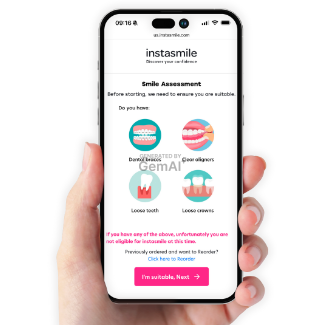
To use your HSA or FSA debit card, add products to your cart as usual, through taking our Smile Assessment..
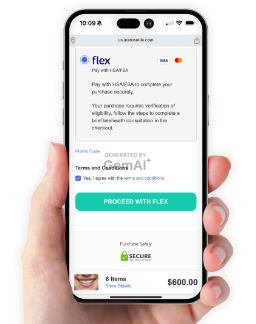
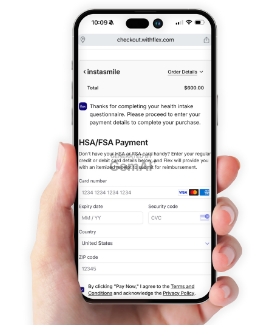
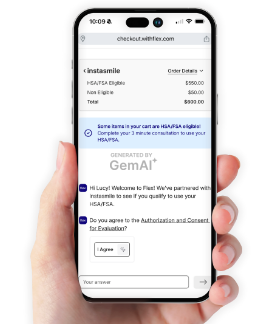
At checkout, select Flex | Pay with HSA/FSA as your payment option, answer some quick questions on the telehealth consultation, enter your HSA or FSA debit card to complete your purchase. You will be emailed an itemized receipt and Letter of Medical Necessity from Flex for your records..
If you don't have your HSA or FSA card handy, you can enter credit card information and Flex will email you an itemized receipt to submit for reimbursement..
Complete Smile Assessment
Select Flex | Pay at checkout.
Complete Brief Telehealth Consultation
Pay with your HSA/FSA Card.
FAQs

What is HSA/FSA and what are the benefits? 

An FSA (Flexible Spending Account) and an HSA 

(Health Savings Account) are tax-advantaged accounts 

for medical expenses but differ in key aspects. FSAs, 

employer-sponsored, allow employees to use pre-tax 

dollars for medical expenses such as prescriptions and 

copays, but typically feature a "use-it-or-lose-it" policy 

where funds must be used within the plan year. HSAs 

are available to those with a high-deductible health plan 

and offer more flexibility, allowing funds to roll over annually.


For more information, see Flex’s Comprehensive Guide

 to HSA/FSAs (opens in a new tab).

How can I spend my HSA/FSA funds at Peak Smile?

Select “Flex | Pay with HSA/FSA'' at checkout. Input your 

card details and checkout as usual.


If a purchase requires verification of eligibility, follow the 

steps to complete a brief telehealth consult via chat.

Why was my HSA/FSA card rejected?

Like any credit or debit card, HSA/FSAs can be declined if 

any of the data from the card is incorrect (number, expiration 

date, zip code etc). Flex will alert you in checkout if any of 

these fields is missing or incorrect so you can update them.
 

The most common reason for rejection of the card is insufficient 

funds. Reach out to your HSA or FSA provider to verify the amount 

of money in your account before attempting to complete your 

purchase again.

I don't have a HSA or FSA card, can I still use my HSA/FSA funds?

Yes, you can still be reimbursed for the expense.
 

Select “Flex | Pay with HSA/FSA” at checkout. Instead of 

entering your HSA or FSA card, input your regular credit card.
 

Flex will email you an itemized receipt following your purchase. 

Submit the itemized receipt to your HSA or FSA provider for 

reimbursement.

Who is Flex and what is their relationship with Peak Smile?

Flex has partnered with Peak Smile to enable consumers 

to use their HSA/FSA funds. You can think of Flex as an 

alternative to payment method, similar to Affirm, Klarna etc.

I still have more questions on HSA/FSA, who should I reach out to?

Please use our contact form.

Help! I didn't receive an email from Flex with my itemized receipt and/

or letter of medical necessity.  What should I do? 

Please check your spam folder, as sometimes emails from 

notifications@withflex.com may be automatically filtered

 as spam by some email service providers. 

If you still can’t find it, please email support@withflex.com 

and let them know the email address associated with your order.

See All FAQs